Case study
Dynamic Link Generator
Half the emails per campaign and no stored links at all, by routing on subscriber data we already had.
The challenge
Every call to action in every email pointed at a stored link, held with a third-party service that guessed where the reader was and redirected them. Over years that became more than 100,000 links. Then we restructured the site’s navigation and URL paths, and effectively all of them broke at once.
Volume was only half of it. Guessing at location is wrong often enough to matter. A subscriber on a VPN, or traveling, gets sent to a store they can’t buy from. Their actual market and language were already sitting on their subscriber record, and we were inferring something we had been told.
On top of that, the whole library was about to move to a new provider. Porting 100,000 links would’ve carried the problem into the new system and kept it there for years.
Constraints
Four conditions shaped the work before any design started. Three were real limits. One I chose.
- Technical Route on the data we already had
The only routing signal available was what already sat on the subscriber record. Our two audiences don’t carry the same fields: demonstrators, the independent sellers who run their own businesses on our products, have a preferred language on file. Customers don’t, and for that audience it was never applicable. The logic had to be built on that asymmetry rather than around it.
- TechnicalScope A wrong link fails silently
The tool hands a non-technical team a block of code to paste into an email. A bad link doesn’t throw an error. It sends someone to the wrong country’s store, and nobody finds out until after the send.
- Resource No engineering time, by choice
Engineering time wasn’t the right thing to spend here. Once I scoped the problem it was clear it didn’t need a developer, and a tool that needs one to change is a tool that stops changing.
- Scope One quarter, with the ground moving
The migration to a new link provider was already decided and already scheduled. That set the window, and it set the stakes. Whatever we didn’t fix before the cutover, we would carry into the new system and live with for years.
Approach
The frame I started with.
We were sending 14 emails, one per market, built from a smaller set of shared templates. The content didn’t differ by market. The links did, and a link can’t change inside a single send, so each market needed its own copy of an email that was otherwise identical. That reframed the problem. It was never “how do we manage 100,000 links.” It was “what would have to be true for one email to serve every market in its group?”
Options I considered.
Port the links to the new provider and clean up later. The default move, and it fails on its own terms. Email links expire, and an expired link is close to impossible to identify or maintain. We would’ve arrived in a new system already carrying the thing we were trying to leave.
Ask engineering to build it properly, with an API and a database. Once I scoped the problem I could see it didn’t need them. It needed someone who understood the subscriber data and the email platform.
Hand the team a spreadsheet or a snippet library and skip the interface. Cheapest to build. I rejected it outright: it puts a technical burden on people whose job isn’t technical, and it would’ve routed every link request back through me forever.
The pick and why.
Build the routing into the send. The subscriber record already carries the market and the language, so the link can be assembled when the email opens, from fields we already hold, and nothing needs to be stored anywhere. It also routes on what the subscriber told us rather than on what their IP suggests, which is both more accurate and closer to what they actually agreed to.
The discovery
What the data already knew
Nobody had looked closely at the subscriber records. The assumption was that this needed a developer, so it stayed unexamined. It didn’t need a developer. It needed someone to open the data and see what was in it.
Three things came out of that. The market groups were already there, in the way the email team segments. The routing splits into three kinds, and only one of them is complicated. And a meaningful share of the links didn’t need routing at all: they sat on emails that only ever went to one market, routing a decision with no branches.
- A stored link per call to action, per email
- A vendor guessing at location from an IP address
- Links that outlive the emails that used them
- One email per market, from a shared template
- No stored link at all, assembled at open time
- Routing from the market and language on file
- Nothing to expire, nothing to maintain
- One email serving every market in its group
The duplication was never a content problem. It was a link problem, and it had been filed under content for years.
- One country No routing needed. A plain address does the job.
- its store
- By country One branch per market, and a default for everyone else.
- market store
- market store
- market store
- fallback store
- By country and language A second branch inside the market that speaks more than one language.
- market store
- bilingual market
- language store
- language store
- fallback store
- fallback store
Solution
Three steps, and nothing left to store
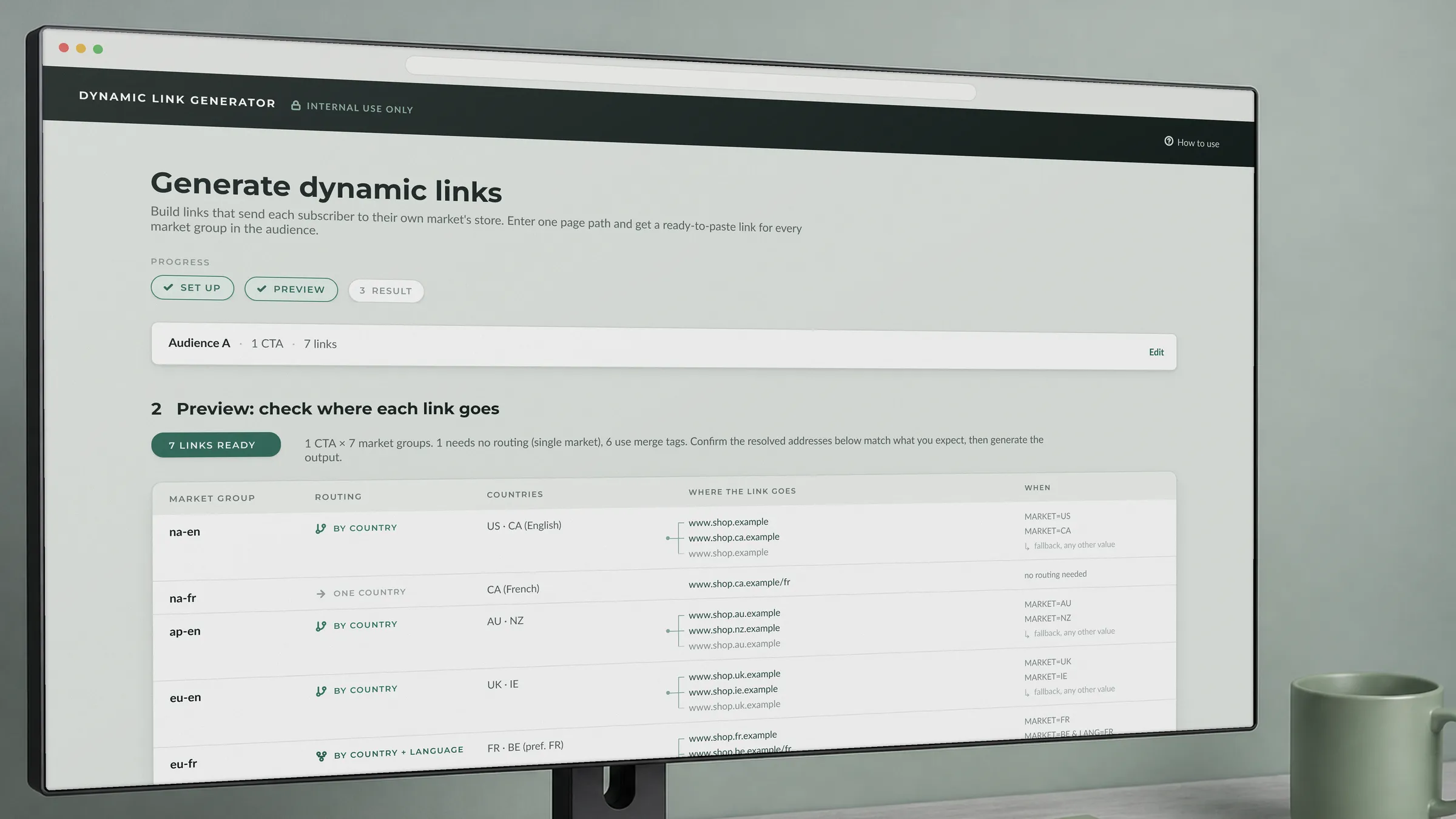
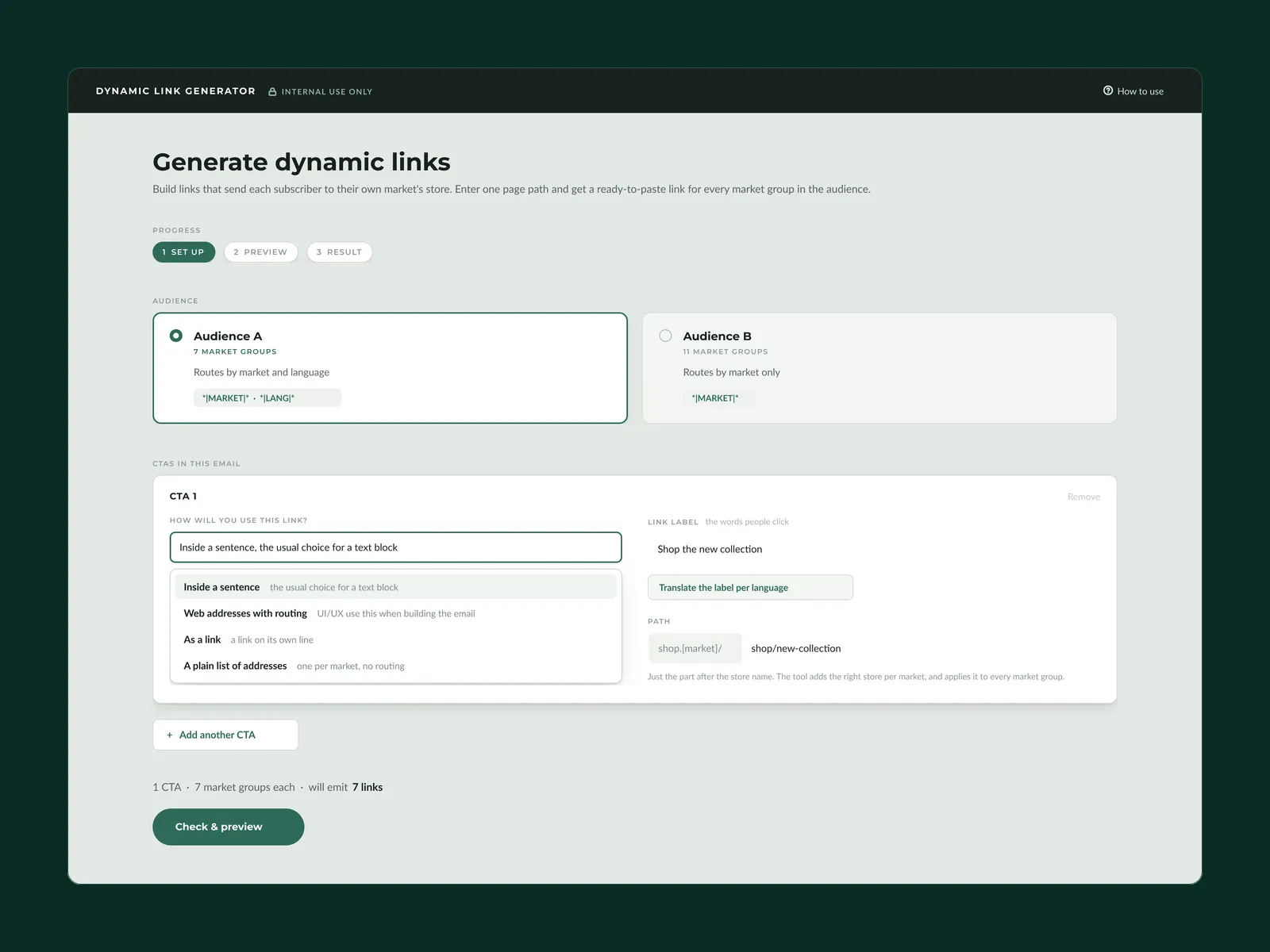
The tool does one job: turn a page path into a ready-to-paste link for every market group in the audience. The three steps exist so nobody is ever holding code before they have confirmed where it goes, and every step stays reachable from every later one, so being wrong costs a click.
- Set up
Pick the audience, name the link, and give it one path. Setup also asks how the link will be used, and the answers cover the whole workflow rather than the whole space of possibilities: three ways the email team places a link, and one that hands the raw routed addresses to whoever is building the email. The label can be translated per language in the same pass, so one run produces the routing and the localized wording together.
- Preview
A plain table: market group, countries, where the link goes. Every resolved address is spelled out, fallbacks included, so nobody has to read a conditional to know what it does. The table also names each group’s routing type, whether it goes to one country, routes by country, or routes by country and language. That’s the distinction I found in the data, and the team learns it by using the tool rather than by being told.
- Result
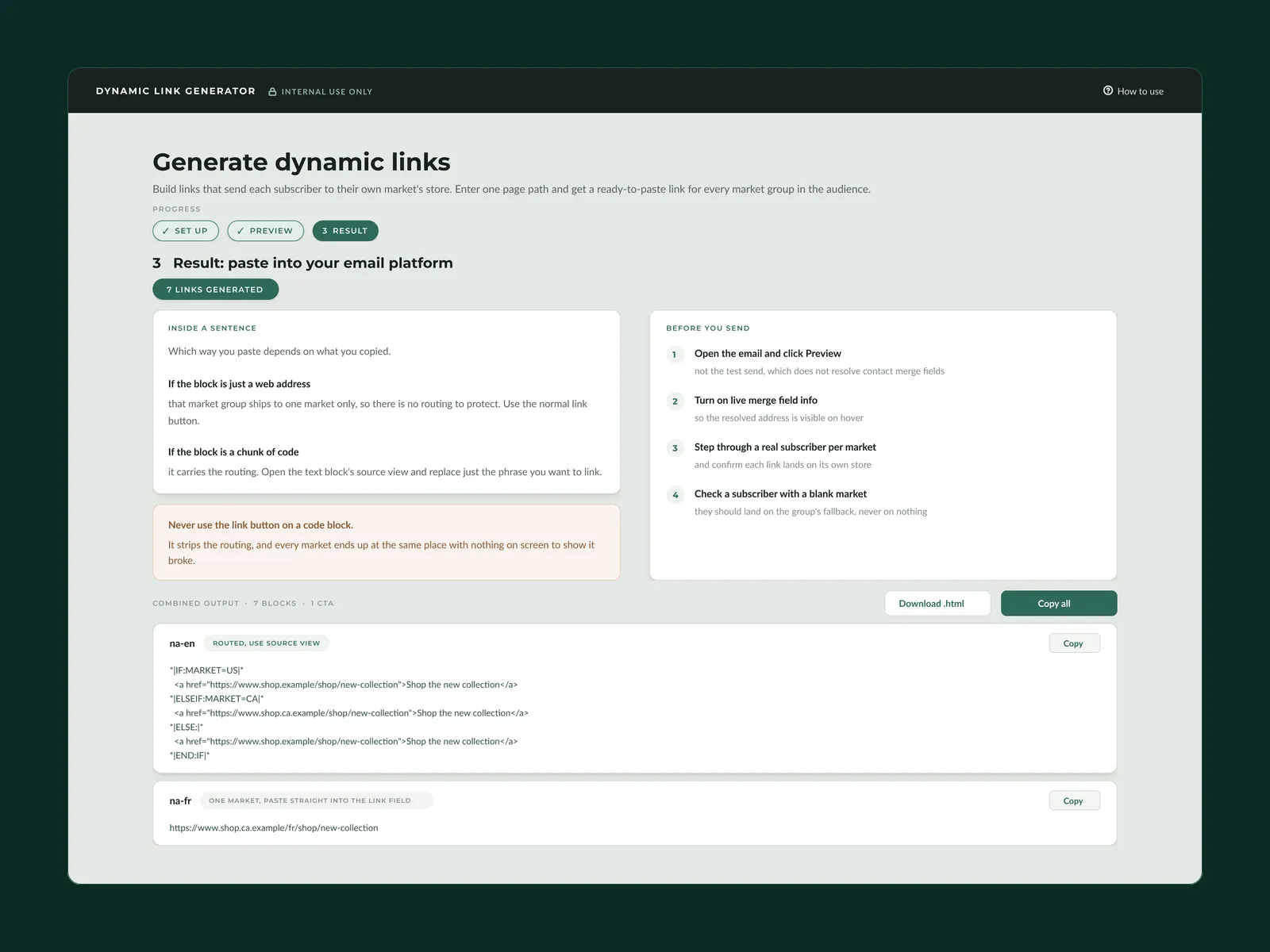
The output blocks, each labeled with what kind of thing it is: routed logic that has to go in through source view, or a plain address that can go straight into the link field. Copy one, copy all, or download the set for handoff.
*|IF:MARKET=A|* <a href="https://store-a.example/shop/new-collection">Shop the new collection</a>*|ELSEIF:MARKET=B|* *|IF:LANG=FR|* <a href="https://store-b.example/fr/shop/new-collection">Shop the new collection</a> *|ELSE:|* <a href="https://store-b.example/shop/new-collection">Shop the new collection</a> *|END:IF|**|ELSE:|* <a href="https://store-a.example/shop/new-collection">Shop the new collection</a>*|END:IF|*Designing for handoff
Built for people who can't debug it
Two decisions came out of watching how this would actually fail rather than how it would work.
Every branch gets a fallback. A subscriber with a blank or unexpected country used to get nothing. Now every conditional ends in a default, so the worst case is the market group’s main store rather than a dead link. This was the failure mode that worried me most, because it’s the one nobody reports. It just quietly costs a sale.
The instructions ship inside the output, not beside it. The last step tells you how to paste each kind of block, and names the one action that breaks it: using the platform’s link button on a routed block strips the logic, and every country silently lands in the same place with nothing on screen to show it broke. Then a checklist for verifying before send, including the fact that preview resolves the merge fields and a test send doesn’t. Guidance in a separate document is guidance nobody reads at the moment they need it.
Handoff
Owned by the team that owns the links
The point was never to build something only I could run. Link creation belongs with the email team, and this hands it to them instead of routing it through design.
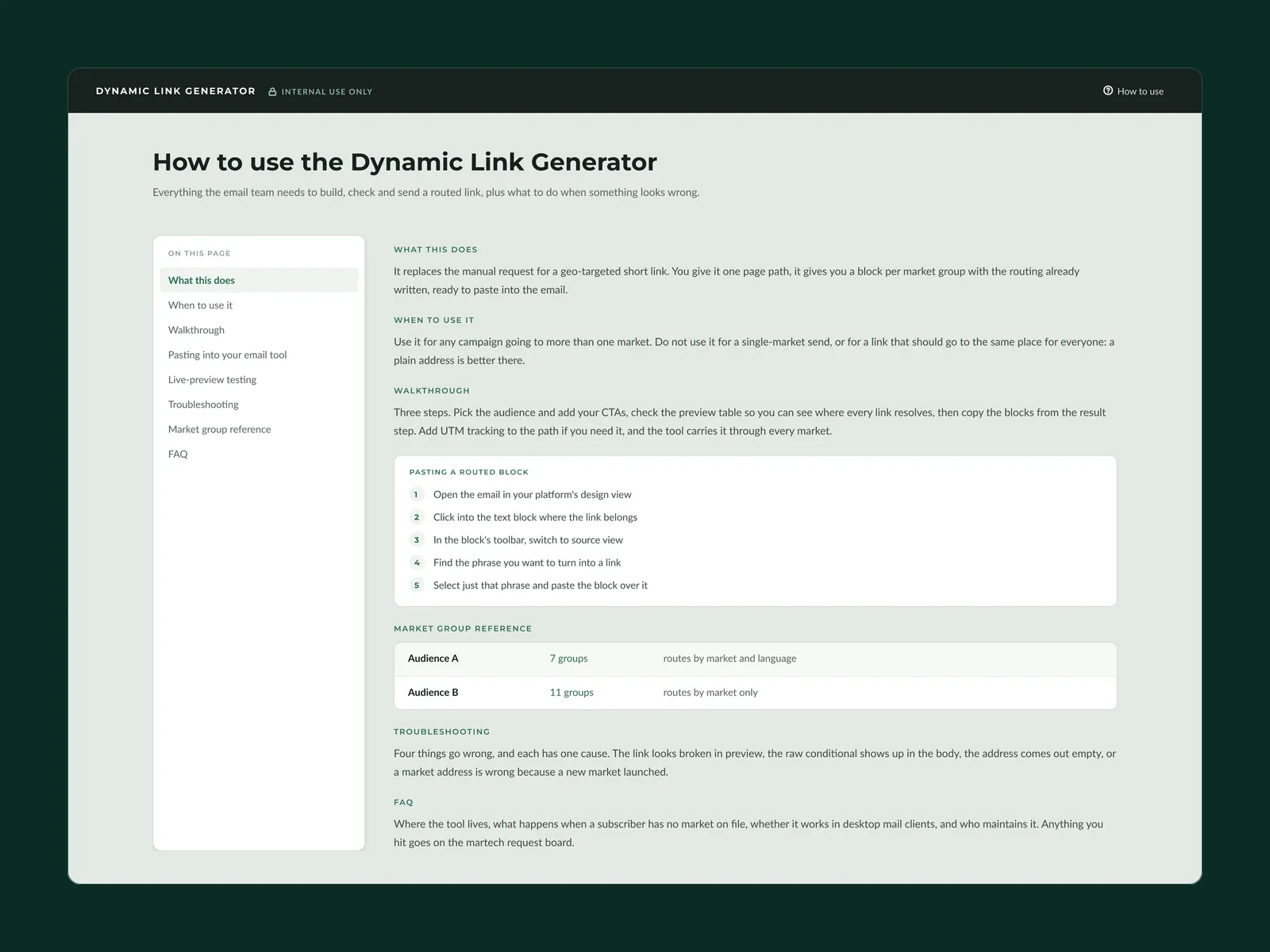
- Guide A how-to that answers the next question Written walkthrough with screenshots, what the tool does, and who to contact when the segmentation changes.
- Logic Editable without a developer The routing sits in plain sight in one file, so a change in email strategy is an afternoon rather than a ticket.
- System A base for the next tool I built a small design system underneath this one, and have since built more internal tools on top of it.
We may change email providers at some point. A tool this team depends on should survive that, so simple and adaptable was a requirement I set myself rather than an accident of scope.
The tool
Three steps, start to finish
Set up once, check where every link resolves, then paste. The guide ships with it, because the person using this on a Tuesday afternoon isn’t the person who built it.
Results
- 7
- Zero
- 20
Figures are counts or floor values, shown this way to respect company confidentiality. Send counts and routing logic are exact. The tool went live one month before this was written, so the campaign count is an early number rather than a track record.
What I'd carry forward
Understand the data instead of working around it. Geo-detection was a way of avoiding what we already knew about people. Once I opened the subscriber records, most of the routing was already there waiting to be encoded. Routing links is only the first use of it: the same conditional logic that picks a store can pick a language, which is what would take the template count down again, from seven toward four. That work hasn't happened yet, but the mechanism is built and running.
Map the whole workflow with the team that owns it, not just the part you own. I handed off test emails that didn't work at first, and we spent time working out the logic together that we could've spent building. I understood their pain points. I should've sat inside their workflow end to end before I built for it.
Knowing what to ask for is most of the problem. Our backend team delivers exactly what you request. If you don't know what's available, you get gaps, and nobody is at fault. Making the routing depend on subscriber fields gave the email program a reason to care about that data, and I've carried the same question into every data request I have made since.